

Below you’ll find the steps to activate Google Ads or Google Free Links.
The activation procedures are very similar, with one main difference:
Google ADS: You will need to create a hotel campaign on Google Ads and link it to our hotel center. Contact our support team to get the hotel center ID to connect. Your property will appear in the first block of sponsored results.
Google Free Links: no credit is required. Your property will appear in the second block under “Show more rates,” in the free organic results section, labeled “Official website.”
⏱️ Note: for both solutions, it may take up to two weeks before Google starts displaying your property’s prices and the link to the booking engine in search results.
Create your business listing for free on Google My Business using the same details as your Octorate account. Enter:
Phone number 📞
Property address 🏠
⚠️ WARNING:
The property cannot be a holiday home or an apartment.
If you are a Vacation Rental and want to connect with Google, refer to our article dedicated to Google Vacation rental
Google services are not available for hostels or hotels with dormitory rooms.
Ensure your Booking Engine is:
Included in your subscription
Properly configured
Equipped with a competitive pricing strategy
Set with discounts to encourage direct bookings 💰
Verify that the Metasearch package is included in your subscription.
⏱️ Note: after activation, it takes 36 hours before Metasearch becomes visible.
Check that your business is registered on Google 👇
https://support.google.com/business/answer/2911778?hl=it
---
⚠️ IMPORTANT! It may take up to two weeks for Google to update the inventory and start showing your property in search results (both for Google Ads and Free Links).
At that point, when searching your property name on Google or its platforms, your MyBusiness profile will appear, followed by 2 rate blocks.
If you have configured your account correctly, your property’s rate will appear in the second block — GOOGLE FREE LINKS — dedicated to organic results, free with Metasearch, labeled “Official website,” to distinguish it from OTAs (or sponsored results). Guests will be able to compare it with other portals.
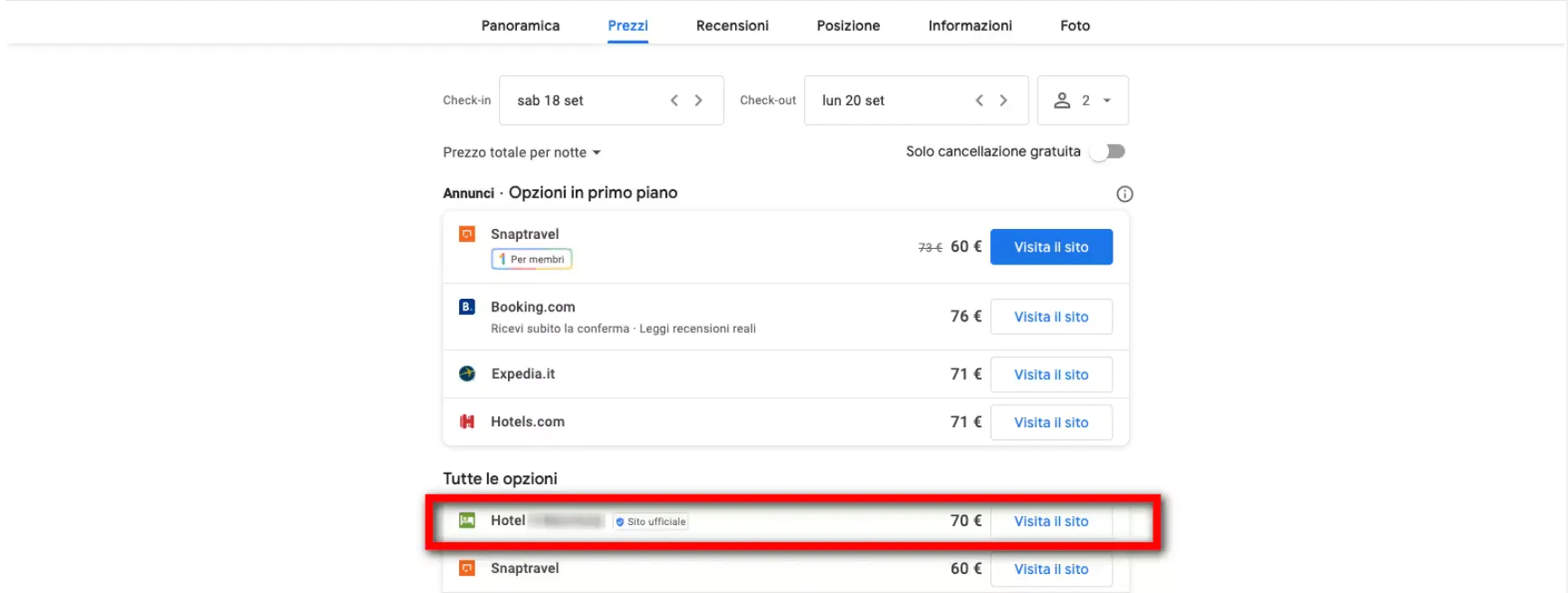
To appear instead in the first block, dedicated to Google Hotel Ads campaigns, follow one last step:
You will need to create your hotel campaign directly on Google Ads and will be able to link it to our hotel center in a few simple steps. Contact our support team to get the hotel center ID to connect and to find out exactly how to submit the linking request.
From the Reservations section, click on the statistics button to view the full list of bookings received through Google Hotel Ads.
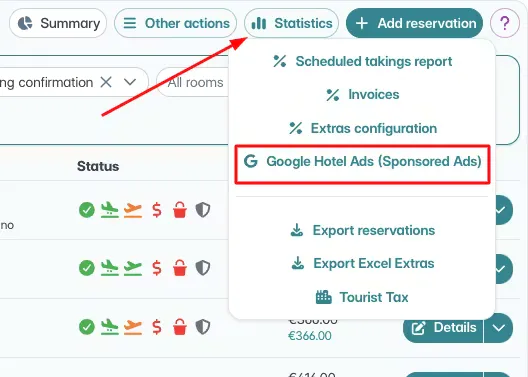
You can recognize bookings from Google Ads by the “G” icon:
Green 📗 → bookings from the free Metasearch configuration
Blue 📘 → bookings from sponsored Ads (with credit in Octorate)
⚠️ Booking Engine Updates: changes that don’t involve calendar, prices or availability (photos, descriptions, cancellation policies) are updated on Google every 24 hours.
💰 Price Display: Google Hotel Ads always shows the best available rate. If you have two rates (e.g., with and without breakfast), the cheaper one (room only) will appear.
🚫 Limitations: Google services are not available for:
Hostels
Hotels with dormitory rooms
Holiday homes
Apartments
See you soon!
🐙
