


If you want to list your property on Trip.com, you can do so directly from the Octorate management system, with no need for other external tools.
First, contact the Trip.com portal: they will provide you with a hotel ID code, which is required to activate the connection.
Go to Channel Manager > Connect a new site
Select Trip.com
Enter the hotel ID received from the portal in the appropriate field
Click Save
Go to the Rooms/Apartments section
Select the room you want to publish on Trip.com
Click Configure, in the Channel Manager > Export content to portals section
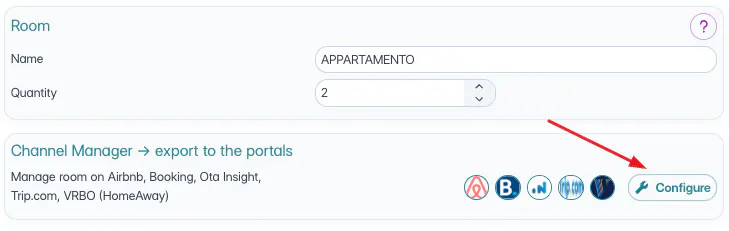
Select Trip.com and complete the required information by filling in the following fields:
General Information
Basic room details.
Available Rooms
Configure the number of bedrooms and bed types. Bathroom configuration is not required.
Descriptions
Must be entered only in English and/or Chinese: the portal does not read other languages.
Rates
To create a new rate plan, click the pencil icon > Create new rate, then select the cancellation policy to associate with it.
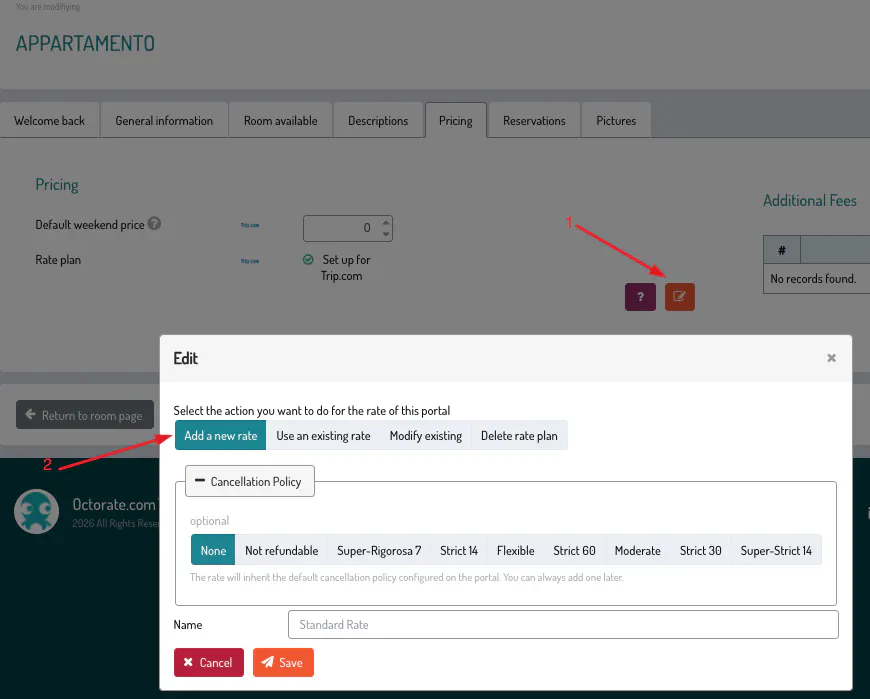
If you've already set up rate plans for Trip.com, you have two options:
Use an existing rate: associate the room with an already created plan
Update an existing rate: modify the name and cancellation policy of an existing plan (the change will apply to all rooms already linked to that plan)
⚠️ You can also delete a rate plan, but only if it's not associated with any room. Please note: this action is irreversible.
Bookings
In this section, you can only specify whether smoking is allowed in the room; other fields are not read by the portal.
Images
These are optional and not required to complete the push.
After the push is completed, Trip.com will carry out internal checks on the submitted data. Once the property is validated, you will receive a confirmation email notifying you of the activation.
📌 Please note: the listing does not go live immediately, as the property is first subject to review by the portal.
🐙
